AutoCAD MIRROR Command (MI): How to Mirror Objects in AutoCAD 2026 (Updated October 2026) (Updated October 2026)
AutoCAD remains India's most in-demand design tool — NASSCOM-Deloitte projects 1.25 million AI-proficient engineering professionals needed by 2027, and AutoCAD skills appear in over 70% of manufacturing and civil engineering job postings on Naukri. The MIRROR command (shortcut: MI) is one of the five commands every professional drafter uses every single day. Here's the thing: if you're spending more than 30 seconds recreating the other half of a symmetrical part, you're working harder than you need to. At Bajaj Auto (Akurdi), Tata Motors (Ranjangaon), and Bharat Forge (Kagal), draftspeople use MI dozens of times per shift. Once you master MIRROR, you'll never draw half a symmetrical part twice again.
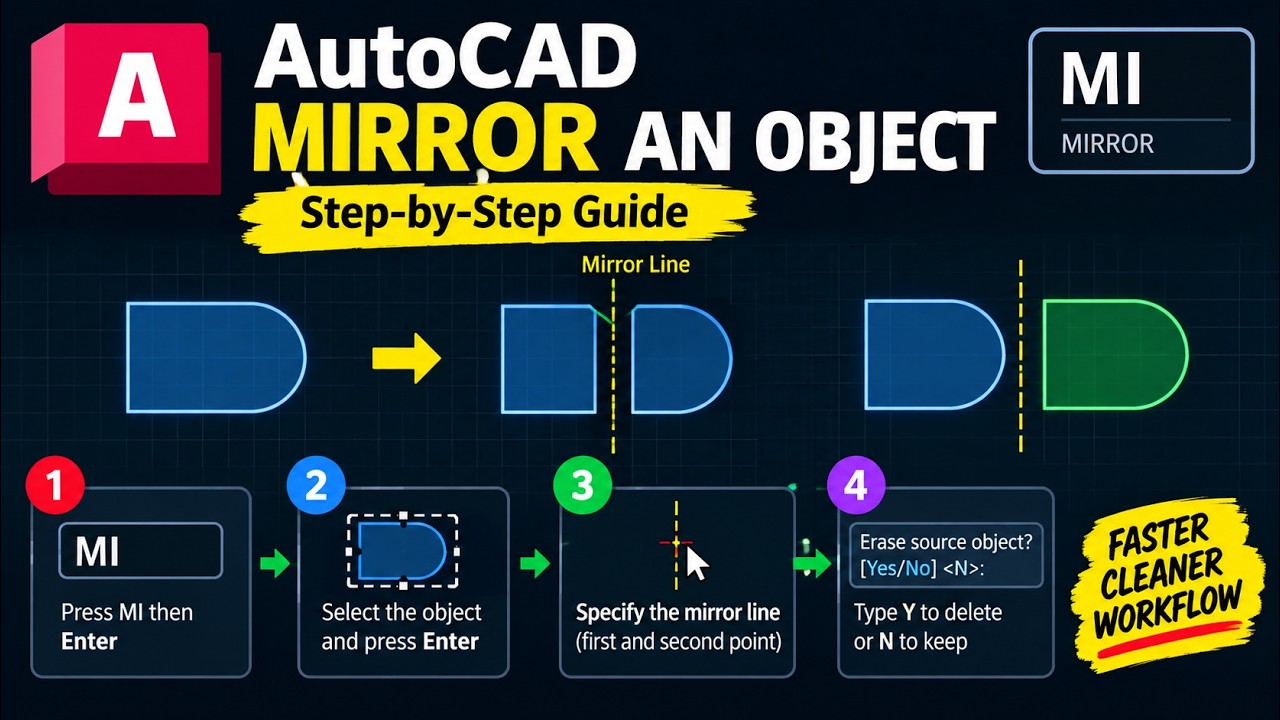
- Type MI > Select objects > Enter > Click two points (mirror line) > Enter > N (keep original) or Y (delete original)
- The mirror line does NOT need to be pre-drawn — just pick two points on screen
- Set MIRRTEXT = 0 to keep text readable after mirroring (professional standard)
- Set MIRRHATCH = 1 to mirror hatch patterns correctly in civil and mechanical drawings
- Works on lines, arcs, polylines, blocks, hatches, dimensions, and text
What Is the AutoCAD MIRROR Command?
The AutoCAD MIRROR command creates a perfectly reflected copy of selected objects across a user-defined axis (mirror line) — you choose whether to keep or delete the original. MIRROR is activated by typing MIRROR or alias MI in the command line. It works on all AutoCAD object types: lines, arcs, polylines, blocks, hatches, dimensions, and text. The mirror line is virtual — it does not need to be drawn — and can be at any angle. The geometry reflects precisely across it with zero manual calculation, making MIRROR one of AutoCAD's most powerful tools for bilateral symmetry in mechanical, civil, electrical, and architectural drawings.
Step-by-Step: How to Use MIRROR (MI) in AutoCAD
Use MIRROR by typing MI and pressing Enter; select objects and press Enter; click the first point of the mirror line, then the second point; type N to keep the original or Y to delete it, then press Enter. Step-by-step: (1) Type MI Enter. (2) Select objects (click, window, or crossing select) and press Enter. (3) Click the first point of the mirror line — use OSNAP midpoint or endpoint for precision. (4) Click the second point to define the mirror axis. (5) Type N (keep original for a symmetrical copy) or Y (delete original for a flipped copy) and press Enter. The mirrored geometry appears instantly. Activate F8 (Ortho mode) before picking mirror points to lock the line to exactly 0 degrees (horizontal) or 90 degrees (vertical) — the most common professional requirement.
Defining the Mirror Line: Object Snap Tips for Precision
The mirror line is defined by any two screen points, and object snaps ensure precision every time. Common professional methods: Midpoint snap on a horizontal centreline (top-bottom symmetry), Midpoint snap on a vertical edge (left-right symmetry), or typed coordinates (click a point, then type @0,100 for a perfectly vertical 100-unit mirror line). For X-axis mirroring, use @1,0 as the second point; for Y-axis, use @0,1. Use F10 (Polar Tracking) to constrain the cursor to 0, 45, or 90 degrees without typing. The fastest professional method is using Midpoint OSNAP on an existing centreline — it snaps your mirror axis to the exact geometric centre of the part with one click.
MIRRTEXT and MIRRHATCH: Critical System Variables for Mirroring
MIRRTEXT = 0 keeps text readable after mirroring — the professional standard. Set it by typing MIRRTEXT in the command line and entering 0. Modern AutoCAD (2020+) defaults to 0, but old DWG files or DXF imports may have MIRRTEXT = 1, which causes text to appear backwards. MIRRHATCH controls hatch pattern mirroring: MIRRHATCH = 1 mirrors hatch fill correctly (recommended for civil section drawings and mechanical cross-sections). Type MIRRHATCH in the command line and enter 1 to enable it. At companies like L&T Construction and Tata Tech, keeping MIRRHATCH = 1 ensures section hatching looks correct on both sides of a mirrored drawing. Check both settings when opening old DWG files or receiving DXF imports from client systems.
| Feature | MIRROR (MI) | COPY (CO) | ARRAY (AR) |
|---|---|---|---|
| Creates reflected copy | Yes | No | No |
| Keeps original (optional) | Yes | Yes | Yes |
| Multiple copies in one step | No | Yes (multiple) | Yes (pattern) |
| Pattern layout | No | No | Yes |
| Keyboard shortcut | MI | CO | AR |
| Best for | Symmetrical parts, flanges, brackets | Duplicating to a new location | Bolt circles, grids, repetitive elements |
MIRROR vs COPY vs ARRAY: When to Use Each
Use MIRROR when you need a reflected symmetrical copy; use COPY (CO) when duplicating to a new location without reflection; use ARRAY (AR) when repeating in a grid or circular pattern. MIRROR is fastest for bilaterally symmetrical parts — brackets, flanges, door frames, structural connections, and MEP layouts. COPY is better when placing the same geometry at a different location without reflection. ARRAYRECT suits rectangular grids (window mullions, reinforcement bars), and ARRAYPOLAR suits circular repetition (bolt circles, gear teeth). At L&T Construction Pune and Tata Tech Hinjewadi, MIRROR is the daily command for structural framing and coordinated MEP drawings where bilateral symmetry is a design requirement.
Real-World Uses of MIRROR in Indian Engineering Drawing
In Indian engineering practice, MIRROR has daily use in mechanical design (flanges, connecting rods, bearing housings, brackets), electrical panel layouts, structural steel connections (cleat plates, gusset plates), and architectural elevations (door and window frames). Real example: a draftsperson at Bharat Forge Kagal designing a connecting rod draws the upper half of the cross-section, then mirrors it to produce the complete symmetrical profile — saving 50% of drawing time with perfect accuracy. AURIC (Aurangabad Industrial City — Rs. 71,343 crore investment, 62,405+ jobs) civil and infrastructure projects use MIRROR for symmetric bridge abutments, column layouts, and MEP coordination. At ABC Trainings (Wagholi, Hadapsar, Cidco, Osmanpura, Sangli), our AutoCAD practical sessions cover MIRROR alongside ARRAY, STRETCH, TRIM, and EXTEND using real Maharashtra manufacturing plant drawings.
AutoCAD training at ABC Trainings is eligible under the Maharashtra CMYKPY scheme (Chief Minister Yuva Karya Prashikshan Yojana), providing Rs. 6,000-10,000 stipend for eligible students. PMKVY 4.0 (2.1 crore trained nationally) — ABC Trainings is a registered partner. Call +91 7039169629 to check your eligibility.Get the CAD/CAM Brochure + Fees + Batch Dates on WhatsApp
Free 1:1 counselling. Placement track record. CMYKPY/PMKVY eligibility check.
💬 Get Brochure on WhatsApp📞 Call 7039169629About the author: Komal Chilwar, Civil & BIM Trainer, ABC Trainings.
Visit Our Centers
- Wagholi (Pune): 1st Floor, Laxmi Datta Arcade, Pune-Ahilyanagar Highway. Call 7039169629
- Hadapsar (Pune HQ): 1st Floor, Shree Tower, opp. Vaibhav Theater, Magarpatta. Call 7039169629
- Cidco (Chh. Sambhajinagar): Kalpana Plaza, opp. Eiffel Tower, N-1 Cidco. Call 7039169629
- Osmanpura (Chh. Sambhajinagar): S.S.C Board to Peer Bazar Road, near Jama Masjid. Call 7039169629
- Sangli: Shubham Emphoria, 1st Floor, Above US Polo Assn., Sangli-Miraj Rd, Vishrambag. Weekend batches available. Call 7039169629
FAQs
How do I mirror an object in AutoCAD step by step?
To mirror an object in AutoCAD: type MI and press Enter; select the objects and press Enter; click the first point of the mirror line, then the second point; type N to keep the original or Y to delete it, then press Enter. Use OSNAP midpoint or endpoint so the mirror line aligns precisely with the part geometry. Activate F8 (Ortho) for perfectly horizontal or vertical mirror lines.
What does MIRRTEXT do in AutoCAD and how do I set it to 0?
MIRRTEXT is a system variable that controls whether text flips backwards when MIRROR is used. Set MIRRTEXT = 0 to keep all text readable after mirroring — the professional standard. Type MIRRTEXT in the command line, type 0, and press Enter. In AutoCAD 2020+, MIRRTEXT defaults to 0, but check it when opening older DWG files or DXF imports where it may have been changed to 1.
Can I mirror a block, dimension, or hatch in AutoCAD?
Yes — AutoCAD MIRROR works on blocks, dimensions, hatches, polylines, splines, circles, arcs, and text. Set MIRRHATCH = 1 for hatch patterns to mirror correctly. Dimensions mirror with values intact, but verify text orientation after mirroring. To mirror the interior geometry of a block (not just its insertion point), explode it first with X (EXPLODE) then apply MIRROR.
Which is the best AutoCAD training institute in Pune for practical drafting skills?
ABC Trainings is the best AutoCAD training institute in Pune for practical drafting, with centres at Wagholi and Hadapsar. We have trained 20,000+ students since 2014 and hold corporate training contracts with Indian Army BRO, PWD Maharashtra, RBI, and BARC. Our AutoCAD courses cover 2D drafting, 3D modelling, and command shortcuts using real industry drawings. Compared to CADD Centre and NIIT, we offer smaller batches (max 15 students), CMYKPY/PMKVY eligibility, and direct trainer access. Call +91 7039169629.