Creo Parametric Relations and Parameters Tutorial: How to Link Dimensions in Design (Updated September 2026) (Updated September 2026)
Among all the features that separate a competent Creo user from one who is just drawing shapes, Relations and Parameters are the clearest dividing line. Every manufacturer that runs Creo Parametric — Bajaj Auto, Tata Technologies, Endurance Technologies, the aerospace vendors at Chakan — expects their designers to build models where changing one master dimension updates the entire geometry. That is what Relations and Parameters do. In the AURIC manufacturing zone alone, the Rs.71,343 crore investment and 62,405 new manufacturing jobs being created are driving demand for designers who can build production-ready parametric models, not just static 3D shapes. In this tutorial, grounded in our trainer's live classroom session, you'll see exactly how to add a relation, create a parameter, verify it, and understand when to use each tool.
- Relations are geometric equations linking model dimensions — Creo enforces them automatically on every regeneration
- Parameters are named values (like diameter_one = 20) that replace hardcoded numbers inside relations
- Always run Execute and Verify before closing the Relations dialog — never assume a relation is working without confirming
- Together, Relations and Parameters make your model smart: change one parameter and all linked dimensions update
- Creo parametric design is what Pune's Tier-1 manufacturers (Bajaj Auto, Tata Motors, Endurance) actually hire for
What Are Relations in Creo Parametric? The Honest Explanation
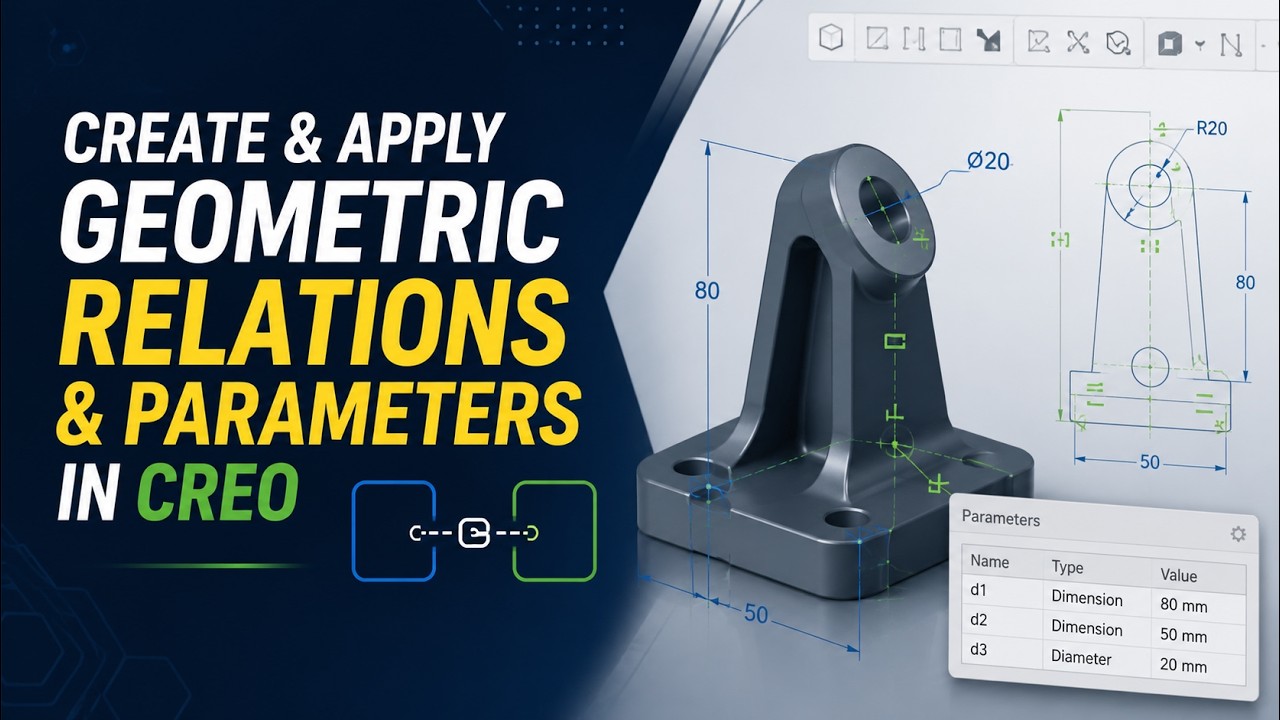
Relations in Creo Parametric are geometric equations you define between two or more dimensions or entities in your model. They enforce a mathematical rule: if you say dimension d1 must always equal dimension d2, Creo makes it so — every time the model regenerates, it recalculates all relations and updates the constrained dimensions accordingly. The example our trainer walked through in class was direct: a circular feature had a radius dimension, and a cylindrical feature had a diameter. The requirement was that the radius must always equal the diameter. Rather than manually updating both every time the design changed, the trainer added a relation: d1 = d2. After that, editing the diameter caused the radius to update automatically — one edit, two dimensions updated, zero manual recalculation.
What Are Parameters in Creo Parametric? Creating Your First Named Value
Parameters in Creo Parametric are named variables that store a value — they work exactly like variables in programming. Instead of hardcoding the number 20 into a dimension, you create a parameter called diameter_one with a value of 20, then reference that name in your relations. The advantage becomes clear when your model has 15 dimensions that all derive from the same base value: change one parameter and all 15 update. Our trainer created a parameter in real time: click the + sign in the Parameters dialog, type a name (diameter_one), select Real Number as the type, enter 20 as the value, and click OK. The parameter is now available to use in any relation — either by typing its name directly or by using the Insert button in the Relations dialog to pick it from a list, which avoids typos.
| Feature | Creo Parametric | SolidWorks | CATIA |
|---|---|---|---|
| Relations / Equations | Dedicated Relations dialog, equation syntax | Equations editor in feature tree | Knowledge Advisor / Parameters |
| Parameters | Full parametric system, Family Tables | Design Tables via Excel | Knowledgeware parameters |
| Verification | Execute and Verify built-in | Suppress / unsuppress check | Update cycle |
| Primary industry (India) | Aerospace, auto (Bajaj, Tata, Endurance) | Consumer products, SME manufacturing | Automotive OEMs, aerospace (Dassault) |
| Pune hirers | Bajaj Auto, Tata Motors, Endurance | Mahindra, Bosch, SME suppliers | Mercedes Benz Ranjangaon, KPIT |
Step-by-Step — How to Apply a Relation in Creo Parametric
Here is the exact process from the classroom session. First, open the Relations dialog — go to Tools in the ribbon and select Relations, or type rel in the search bar. Second, identify your target dimensions — click on the model geometry to see dimension tags (d1, d2, d3, etc.); note which tags correspond to which dimensions. Third, type the equation in the Relations window. To set d1 equal to d2, type: d1 = d2. To set d1 equal to half of d2, type: d1 = d2 / 2. To link a dimension to a parameter, type: d3 = diameter_one. Fourth, click OK to apply. The relation is now active. Fifth — and this step is critical — run Execute and Verify before closing to confirm no errors. Our trainer emphasized this: never assume a relation is working without verifying it at least once.
Step-by-Step — How to Create Parameters and Use Them in Relations
Creating parameters is a separate step from writing relations, though the two work together. Step one: go to Tools > Parameters and click the + (Add) button. A new row appears in the parameter table. Step two: type the parameter name — use a meaningful name like shaft_diameter or hole_spacing rather than generic x or y. Set the type to Real Number. Enter the initial value. Click OK. Step three: open Tools > Relations. In the relations editor, you can now type the parameter name directly in your equation (d5 = shaft_diameter), or click Insert, select Parameters from the dropdown, and pick your parameter from the list. The Insert method is safer — it avoids spelling errors that would cause a relation failure. Step four: verify with Execute and Verify. If the relation resolves successfully, you will see a confirmation message. If it fails, Creo points you to the specific equation that errored.
Verifying Relations — The Execute and Verify Step Explained
Verification is what distinguishes a relation that is written from a relation that is actually working. Creo provides two options in the Relations dialog. Execute recalculates all current relations using the current dimension values — it shows whether any equations produce errors (division by zero, undefined parameter name, circular dependency). Execute and Verify does the same thing but explicitly confirms whether every relation resolved to a valid state. Our trainer used Execute and Verify as the standard final step after every set of relations — not as an optional extra. If you close the Relations dialog without verifying, you may not discover a broken relation until a later regeneration fails in an unexpected way, which is much harder to debug. The habit of verify-before-close is the difference between a clean parametric model and a model that fails at random during downstream assembly work.
Real Use Cases — When Relations and Parameters Save Hours of Work
Here are the practical situations where Creo relations and parameters deliver significant time savings. Standard hole patterns: link hole spacing to part length so the pattern automatically adjusts when length changes — no manual repositioning. Design families: one master parameter (shaft_diameter) drives bore, clearance hole, keyway width, and mating part dimensions across an entire assembly — change one value at the top level and the whole assembly regenerates correctly. Symmetric components: force left-right symmetry by setting matching dimensions equal with a single relation — guarantee your model can never accidentally become asymmetric through an edit. Tolerance-driven designs: express dimensions as base_value + tolerance using parameter arithmetic, so all tolerance stack-ups update when the base specification changes. Family tables: use parameters as the column variables — a single master model generates dozens of size variants (M6, M8, M10 bolts) with no separate files.
Creo Parametric Career Scope and Salaries in Pune 2026
Creo Parametric designers are in consistent demand at India's Tier-1 auto and industrial manufacturers. Entry-level roles with 0–2 years of Creo experience earn Rs.2.8–5.5 LPA; mid-level designers with parametric design, assembly, and drawing experience earn Rs.5.5–10 LPA; senior specialists with advanced parametric modeling, family tables, and tolerance analysis at Tier-1 OEMs earn Rs.10–18 LPA. Pune's manufacturing belt is the deepest Creo talent market in India. Named local hirers with ongoing engineering requirements: Bajaj Auto Akurdi (164+ engineering openings across design and manufacturing), Mahindra Chakan, Tata Motors Ranjangaon, Bosch Pune (MIDC Bhosari), Endurance Technologies Waluj E-92 and Chakan, Skoda Volkswagen Shendra AURIC (Plot A-1/1). ABC Trainings' AI Powered Product Design, Analysis and Simulation program covers Creo Parametric from fundamentals through parametric design, relations, parameters, family tables, and advanced assembly — at Wagholi, Hadapsar, Sambhajinagar, and Sangli centers.
Maharashtra's CMYKPY scheme provides Rs.6,000–Rs.10,000 in subsidies for eligible students from economically weaker sections, directly applicable to ABC Trainings' AI Powered Product Design, Analysis and Simulation program. PMKVY 4.0 has trained 2.1 crore professionals in skill courses nationally. Contact ABC Trainings at Wagholi, Hadapsar, Sambhajinagar, or Sangli to verify your eligibility and current batch schedule.Get the CAD/CAM Brochure + Fees + Batch Dates on WhatsApp
Free 1:1 counselling. Placement track record. CMYKPY/PMKVY eligibility check.
💬 Get Brochure on WhatsApp📞 Call 7039169629About the author: Shubham Choundiye, Mechanical Design Trainer, ABC Trainings.
Visit Our Centers
- Wagholi (Pune): 1st Floor, Laxmi Datta Arcade, Pune-Ahilyanagar Highway. Call 7039169629
- Hadapsar (Pune HQ): 1st Floor, Shree Tower, opp. Vaibhav Theater, Magarpatta. Call 7039169629
- Cidco (Chh. Sambhajinagar): Kalpana Plaza, opp. Eiffel Tower, N-1 Cidco. Call 7039169629
- Osmanpura (Chh. Sambhajinagar): S.S.C Board to Peer Bazar Road, near Jama Masjid. Call 7039169629
- Sangli: Shubham Emphoria, 1st Floor, Above US Polo Assn., Sangli-Miraj Rd, Vishrambag. Weekend batches available. Call 7039169629
FAQs
What is the difference between Relations and Parameters in Creo Parametric?
Relations are mathematical equations between model dimensions — they define rules like a radius must always equal half a diameter. Parameters are named variables — they store a value (like shaft_diameter = 25) that can be referenced inside relations and family tables. In practice, you create parameters to give meaningful names to key design values, then write relations that enforce the mathematical connections between them. Together they make your model smart: change one top-level parameter and all linked dimensions update automatically on the next regeneration.
How do I add a relation in Creo Parametric to link two dimensions?
Go to Tools > Relations in Creo Parametric. Identify the dimension tags on your model (shown as d1, d2, d3, etc. when you hover over geometry). Type your equation in the Relations window — for example, d1 = d2 / 2 sets d1 as half of d2. Click OK to apply. Always run Execute and Verify before closing the dialog to confirm the relation resolved correctly with no errors.
Is Creo Parametric better than SolidWorks for Relations and Parameters?
Creo Parametric has a more mature and explicit relations and parameters system than SolidWorks — the dedicated Relations dialog and Family Tables give it more power for large assemblies and configuration-heavy industrial parts used in auto and aerospace. SolidWorks' Equations editor is simpler and more intuitive for smaller teams and SME manufacturing. Which one to learn depends on where you want to work: Bajaj Auto, Tata Motors, and Endurance use Creo; many Mahindra and Bosch sites in Pune run SolidWorks. ABC Trainings covers both in the AI Powered Product Design, Analysis and Simulation program.
What salary does a Creo Parametric designer earn in Pune in 2026?
A Creo Parametric designer in Pune earns Rs.2.8–5.5 LPA at entry level (0–2 years), Rs.5.5–10 LPA at mid level (3–5 years with parametric design and assembly experience), and Rs.10–18 LPA at senior level for specialists with family tables, tolerance analysis, and multi-discipline assembly skills. Top hirers in the Pune manufacturing belt — Bajaj Auto Akurdi (164+ openings), Mahindra Chakan, Tata Motors Ranjangaon, Bosch Pune, Endurance Waluj E-92 — consistently pay above the national average for certified Creo professionals.