ANSYS Workbench Essentials for Beginners: Part 11 — Simulation Setup, Boundary Conditions and Solving (Updated June 2026)
By the time you reach Part 11 of the ANSYS Workbench series, you have the interface down and a basic mesh or two under your belt. Now the real engineering starts. The Auric industrial belt near Sambhajinagar attracted Rs 71,343 crore in investments and created 62,405 jobs — and companies like Bajaj Auto (Waluj, Plot G-137), Skoda Volkswagen (Shendra, Plot A-1/1) and Endurance Technologies (E-92) are actively hiring engineers who can run structural and thermal simulations in ANSYS. Part 11 is the episode that connects classroom FEA to that job market reality. We cover physics selection, loading and boundary conditions, mesh quality checks, and how to actually read the results your solver produces. This isn't just theory — every step in this guide matches the workflow used in production engineering teams across Maharashtra.
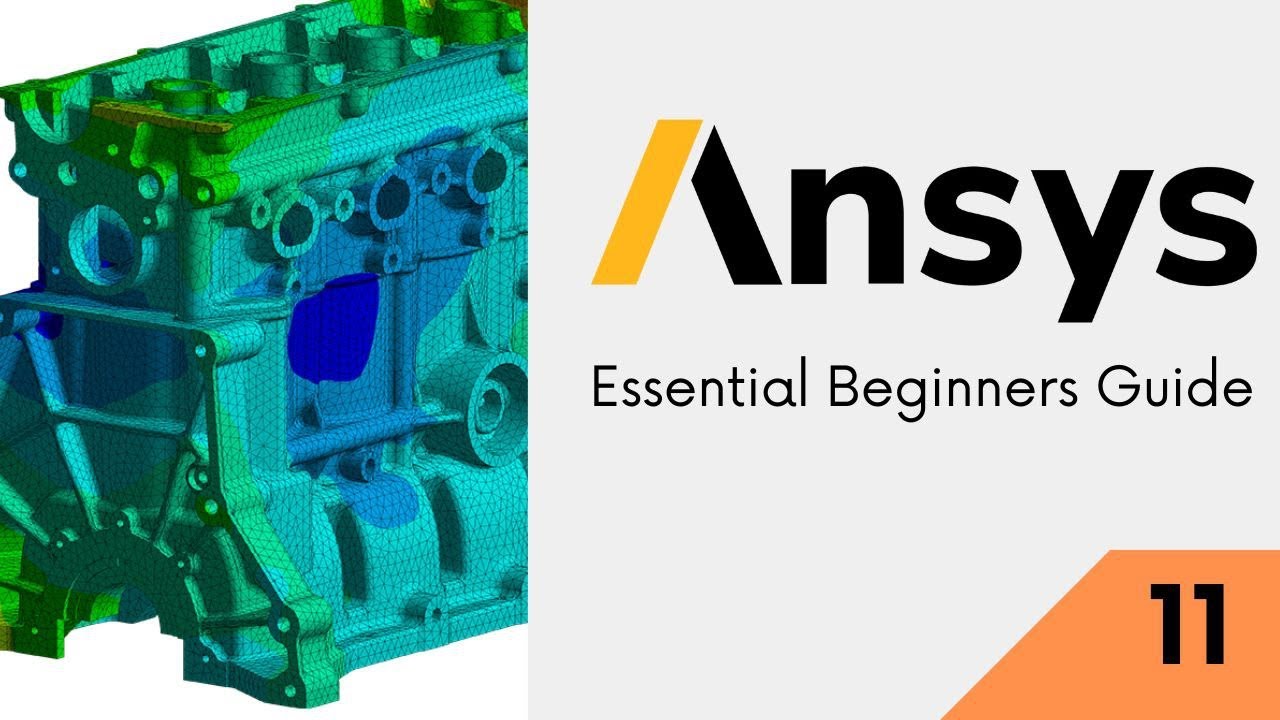
- Physics setup: choosing the right analysis type for structural, thermal or CFD problems
- Boundary conditions: fixed supports, force, pressure, temperature — applied correctly
- Mesh quality: element size, skewness, orthogonality — what numbers to aim for
- Solving: convergence criteria and what to do when the solver fails
- Post-processing: reading von Mises stress, deformation and factor of safety
- FEA Engineer salaries in Pune: Rs 3.5–8 LPA fresher, Rs 12–22 LPA with 3+ yrs (AmbitionBox 2025)
Where Part 11 Fits in the ANSYS Learning Journey
The first ten episodes of this series built your foundation: installing ANSYS Workbench, understanding the project schematic, importing CAD geometry, creating named selections, and running your first basic static structural analysis. Part 11 assumes you can navigate the interface without hunting for menus. We move into the decisions that separate beginner simulations from engineering-grade results. Specifically: which physics module to use, how to apply realistic loading conditions, and what the solver's output actually means for the real component. Watch the full video at the top of this page before reading further — it shows the exact workflow in real time, and this guide explains the why behind each step.
Choosing the Right Physics: Structural, Thermal and Fluid Analysis
ANSYS Workbench offers multiple analysis systems that you add to the project schematic. Static Structural analyzes deformation and stress under constant loads — the bread-and-butter of mechanical engineering. Transient Structural handles time-varying forces and impacts. Steady-State Thermal shows temperature distribution when heat flows through a component. Fluid Flow (Fluent) covers CFD for pipes, housings and aerodynamics. The good news is you don't have to master all of them to be job-ready. In manufacturing companies across Maharashtra — Bosch in Nashik, Mahindra at Chakan, Bharat Forge at Kagal, Kolhapur — the most frequently requested skill is Static Structural for component validation. Start there. Once you understand how loads flow through a mesh and how the solver minimizes the residual error, every other physics type becomes much easier to learn.
| Analysis Type | Solves For | Typical Industry Use | Key Output |
|---|---|---|---|
| Static Structural | Stress & deformation (constant load) | Brackets, chassis, machine parts | von Mises stress, FoS |
| Transient Structural | Stress under time-varying loads | Impact, vibration, crash | Stress vs time plot |
| Steady-State Thermal | Temperature distribution | Heat sinks, engine components | Temperature, heat flux |
| Modal Analysis | Natural frequencies | Rotating machinery, structures | Mode shapes, freq (Hz) |
| Fluid Flow (Fluent) | Velocity, pressure in fluids | Pipes, HVAC, automotive aero | Pressure drop, velocity profile |
Applying Boundary Conditions Without Making These Common Mistakes
Boundary conditions are where most beginner simulations go wrong. The classic error: applying a fixed support to the wrong face, so the model cannot deform the way it would in real life, and your stress results are wildly off. Here is the correct mental model — ask yourself, what is this part actually touching in the assembly? That face gets a fixed support or a frictionless support depending on whether it can slide. Then ask, what forces or pressures act on the part? Those get applied to the correct faces with the correct direction and magnitude. Trust me, units matter here: ANSYS defaults to metric (N, mm, MPa) in most setups but the system can be changed. Always confirm your unit system in the Model tab before you apply a single boundary condition. One other thing students miss: applying a force to an edge or a vertex instead of a face creates artificial stress concentrations that make your results look like the part is about to fail. Always apply distributed loads to faces.

Meshing for Accuracy: Size, Skewness and Convergence
Your mesh controls how accurately the solver approximates the stress and deformation in your model. A coarser mesh solves faster but misses stress gradients at features like fillets and holes. A finer mesh is more accurate but takes much longer to solve and can crash your machine if you're not careful. The practical approach for beginners: start with the default mesh, run the solver, then refine specifically at areas of high stress using the Body Sizing or Face Sizing controls. Target a maximum skewness below 0.9 and maximum orthogonality above 0.1 — check these in the Statistics panel under the Mesh branch. What most people don't realize is that for structural analysis on simple mechanical components, you rarely need more than 50,000 to 100,000 elements to get engineering-accurate results. Companies like Tata Technologies in Pune use ANSYS on real production components with mesh sizes in this range every day.
Solving, Convergence and Post-Processing Your Results
Once you click Solve, ANSYS Workbench sends your model to the solver engine (Mechanical APDL under the hood for structural analysis). A solution monitor appears showing force and displacement convergence. If it converges cleanly — you see the residuals drop steadily to your tolerance — you're good. If it diverges, the most common causes are an underconstrained model (the part can translate or rotate freely in some direction) or excessive mesh distortion. After solving, the post-processing tools let you visualize total deformation, directional deformation along any axis, and equivalent (von Mises) stress. For metal components, compare your maximum von Mises stress to the material's yield strength — divide yield by max stress to get the factor of safety. Most design codes require a minimum factor of 1.5 to 2.0. If you're below that, either redesign the geometry or use a stronger material.
FEA Jobs at Pune and Sambhajinagar Companies — Real Salary Data
FEA simulation skills are among the highest-value technical competencies in Maharashtra's manufacturing sector right now. Bajaj Auto at Akurdi and Waluj (Plot G-137) has over 164 open engineering positions that list ANSYS as a required or preferred skill. Tata Technologies in Pune's IT/engineering hub actively recruits CAE analysts at Rs 4–8 LPA for freshers with ANSYS Workbench proficiency. KPIT Technologies, which serves global automotive clients from Hinjewadi, pays simulation engineers Rs 8–15 LPA with two to three years of experience. Endurance Technologies at Sambhajinagar (E-92, MIDC) and Hyosung (AURIC, Rs 3,000 crore investment) need product engineers who can validate components without physical prototypes — that's FEA. AmbitionBox data for 2025 shows that CAE/FEA Engineer roles in Pune average Rs 7–12 LPA across mid-size firms, rising to Rs 18–22 LPA at OEMs and Tier-1 suppliers. ABC Trainings' ANSYS batch at Wagholi and Hadapsar focuses specifically on the workflows these companies test in interviews. Call 7039169629 to enroll.
Get the CAD/CAM Training Brochure + Fees + Batch Dates on WhatsApp
Free 1:1 counselling. Placement track record. CMYKPY/PMKVY eligibility check.
💬 Get Brochure on WhatsApp📞 Call 7039169629About the author: Rahul Patil. 12 yrs experience training engineers across Maharashtra.
Visit Our Centers
- Wagholi (Pune): 1st Floor, Laxmi Datta Arcade, Pune-Ahilyanagar Highway. Call 7039169629
- Hadapsar (Pune HQ): 1st Floor, Shree Tower, opp. Vaibhav Theater, Magarpatta. Call 7039169629
- Cidco (Chh. Sambhajinagar): Kalpana Plaza, opp. Eiffel Tower, N-1 Cidco. Call 7039169629
- Osmanpura (Chh. Sambhajinagar): S.S.C Board to Peer Bazar Road, near Jama Masjid. Call 7039169629
- Sangli: Shubham Emphoria, 1st Floor, Above US Polo Assn., Sangli-Miraj Rd, Vishrambag. Weekend batches available. Call 7039169629
FAQs
What is covered in ANSYS Workbench Part 11?
Part 11 covers physics module selection (structural, thermal, fluid), applying boundary conditions correctly, mesh quality parameters (skewness, orthogonality), the ANSYS solve workflow, convergence monitoring and post-processing results including von Mises stress and factor of safety calculation.
How difficult is ANSYS Workbench for a mechanical engineering student?
ANSYS Workbench is beginner-friendly in its interface compared to command-line FEA tools. If you understand basic statics and strength of materials, you can run your first meaningful simulation within a few sessions. The learning curve is in understanding which boundary conditions to apply and how to interpret results — exactly what Parts 1 through 11 of this series build toward.
What jobs can I get after learning ANSYS in Pune?
ANSYS-skilled engineers in Pune target roles like CAE Analyst, FEA Engineer and Product Development Engineer at companies like Tata Technologies, KPIT, Bajaj Auto (Akurdi, 164+ openings), Mahindra (Chakan), Mercedes-Benz (Chakan) and Bosch (Nashik/Pune). Freshers typically start at Rs 3.5–8 LPA; experienced CAE professionals reach Rs 12–22 LPA.
Does ABC Trainings offer ANSYS training in Sambhajinagar?
Yes. ABC Trainings runs ANSYS Workbench batches at both Sambhajinagar centres — Cidco (Kalpana Plaza, N-1) and Osmanpura (near Jama Masjid). Weekend batches are available for working professionals. WhatsApp 7774002496 to get the current fee structure and batch schedule.