Revit Structure Episode 3: Structural Modeling — Beams, Columns, Slabs & Foundations (Updated June 2026) (Updated June 2026)
Pune Metro Line 3 broke ground in May 2026 — and with it came a wave of structural BIM demand across Maharashtra. The government has made BIM mandatory for all central government projects above ₹100 crore, and firms like L&T, AECOM, and Shapoorji Pallonji are actively upskilling their structural teams on Autodesk Revit. Here's the thing — most civil and structural engineers who are learning Revit get stuck at the modelling stage. Setting up grids and levels is Episode 1 territory. Episode 3 is where the structural model actually takes shape: placing columns, framing beams, modelling floors and slabs, and creating the foundation system. Every element you place in Revit Structure carries engineering intelligence — section sizes, material grades, structural usage — and that data flows directly into your analysis model and your construction documents. That is the power of BIM, and this episode is where you first experience it properly.
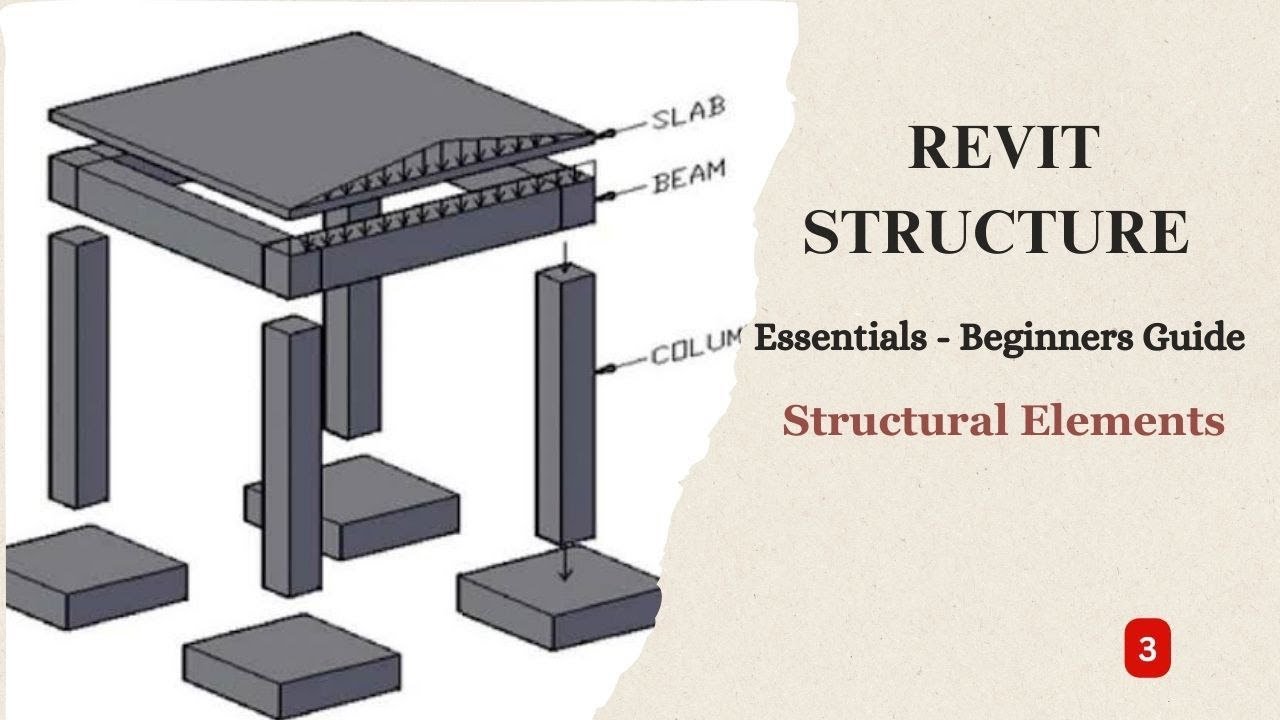
- Revit structural elements — columns, beams, floors, walls — carry parametric properties that drive both the model and the documentation simultaneously
- Structural columns must be placed on grids and at correct levels; beam framing connects column grids using structural framing families
- Floor and slab elements in Revit are sketch-based — you define the boundary, Revit creates the slab with your specified thickness and material
- Foundation elements: isolated footings, continuous wall footings, and mat/raft foundations all have dedicated Revit family types
- BIM structural engineers earn ₹5–10 LPA at 2–4 years; senior Revit leads at L&T or AECOM reach ₹14–22 LPA (AmbitionBox 2025–2026)
- CMYKPY stipend ₹6,000–₹10,000/month available during BIM training at ABC Trainings approved centers in Maharashtra
Placing Structural Columns: Grid Intersections, Levels and Family Selection
In Revit Structure, structural columns are not just visual boxes — they are parametric families with properties including section size (ISMB 200, RCC 300x400, etc.), material (concrete grade or steel specification), base and top constraints, and structural usage. Placing a column on a grid intersection at the correct base level (Ground Floor at 0.00m) and top level (First Floor at 3.60m) establishes the analytical element that links to ETABS or STAAD.Pro via the structural analytical model. In Episode 3, we load the appropriate column families from the Autodesk structural family library — rectangular concrete columns for an RCC frame, I-section steel columns for a steel structure — and place them at every grid intersection using the Column tool in the Structure tab. A key tip that saves time: use the At Grids option in the Column placement dialog to place all columns on all selected grid intersections simultaneously, rather than clicking each one individually. We also demonstrate how to set columns to room-bounding and check that each column base attachment and top attachment are correctly constrained before proceeding to beam framing.

Framing Beams and Girders: Connecting the Structural Grid in Revit
Beam framing connects your column grid and transfers loads down into the columns and ultimately to the foundations. In Revit Structure, beams are placed using the Beam tool — you click the start and end point (typically column face to column face along a grid line) and Revit automatically references the correct structural level. Beam family selection matters: for a typical RCC frame, you will load ISMC or rectangular concrete beam families; for a steel frame, use wide flange (WF/UB) families from the metric structural library. Episode 3 covers three framing scenarios: primary beams spanning between columns, secondary beams spanning between primary beams, and cantilever beams projecting from a column. We also demonstrate the Beam System tool, which automates the placement of secondary framing at specified spacing between two boundary beams — essential for floor framing in multi-storey buildings. After placing beams, check the 3D view and section views to confirm that beam centerlines align with column centerlines and that the top of beam matches your slab underside level.
Modelling Floors and Slabs: Sketch Boundary, Thickness and Span Direction
Floors and slabs in Revit Structure are sketch-based elements — you select the Floor tool, draw or pick the slab boundary in plan view, and Revit extrudes the slab downward by the thickness specified in the Floor Type. The Floor Type controls everything: total thickness, layer composition (topping screed, structural concrete, insulation, soffit finish), material assignment, and whether the element is structural. In Episode 3, we create a 150mm RCC flat slab, a 200mm ribbed slab with predefined rib geometry, and a 125mm post-tensioned slab type, demonstrating how to configure the floor type editor for each. The span direction arrow in the sketch environment sets which direction the reinforcement schedule will reference — get this wrong and your rebar drawings will be incorrect. We also cover openings in slabs: shaft openings for service penetrations are placed using the Shaft Opening tool rather than cutting holes in the slab sketch, which preserves the structural integrity in the analytical model. The good news is that once your floor types are set up correctly in a project template, placing slabs is fast.

| Revit Element | Tool Location | Family Type Examples | Key Property to Set |
|---|---|---|---|
| Structural Column | Structure tab > Column | Rectangular Concrete, ISHB, W-section | Base Level, Top Level constraints |
| Structural Beam | Structure tab > Beam | ISMC Channel, UB Wide Flange, Rect Concrete | Start and End Level offset |
| Floor / Slab | Structure tab > Floor | 150mm RCC, Ribbed Slab, PT Slab | Span direction arrow |
| Isolated Footing | Structure tab > Foundation > Isolated | Pad Footing, Stepped Footing, Pile Cap | Elevation at bottom of footing |
| Wall Foundation | Structure tab > Foundation > Wall | Strip Footing, Raft Strip | Width and Default depth |
| Foundation Slab | Structure tab > Foundation > Slab | Mat/Raft 400mm, 600mm thick | Sketch boundary and level |
Foundation Elements in Revit: Isolated Footings, Strip Footings and Mat Foundations
Foundation modelling in Revit is split into three tools: Isolated Foundation (for column footings), Wall Foundation (continuous strip footings under structural walls), and Foundation Slab (mat or raft foundations). For an isolated column footing, you select the Isolated Foundation tool, choose the appropriate footing family (stepped rectangular, pad, or pile cap), and click each column to attach the footing — Revit automatically places it at the correct elevation below the column base. Footing dimensions and reinforcement cover are specified in the Type Properties. For raft foundations on poor soil — common in Pune's black cotton soil zones and along Sambhajinagar's AURIC expansion — the Foundation Slab tool creates a mass concrete element spanning the full building footprint with its thickness and material defined in the type. In Episode 3, we model a complete foundation system for a 3-storey RCC frame: isolated pad footings for internal columns, combined footings where columns are close to the property boundary, and a continuous strip footing under the external staircase walls. This complete foundation exercise is what most training courses skip — and it is what distinguishes a Revit operator from a Revit-literate structural engineer.
Revit Structural Engineer Salaries in Maharashtra 2026
Based on AmbitionBox, Glassdoor and PayScale data (June 2026): BIM modellers and Revit draughtsmen at 0–2 years earn ₹3–5 LPA in Pune. BIM coordinators with 2–4 years of Revit Structure and Navisworks experience earn ₹6–10 LPA at L&T, AECOM, and Jacobs. Senior BIM managers overseeing multi-discipline coordination on large infrastructure or commercial projects earn ₹14–22 LPA. BIM Directors at EPC companies and international consultancies reach ₹28–40 LPA. With the government BIM mandate for central projects above ₹100 crore and Pune Metro Line 3 underway, demand for qualified Revit structural professionals is outpacing supply — a structured 3–4 month Revit Structure program gives you enough competency to start as a BIM modeller on a real project.
BIM Hiring in Pune, Sambhajinagar and Sangli: Who Is Recruiting
Active BIM and structural engineering openings in Maharashtra (June 2026): L&T Construction, ECC Division — BIM modellers and structural Revit engineers for metro and highrise projects; AECOM India, Magarpatta City Hadapsar Pune — structural BIM coordinators for infrastructure and building projects; PMC Shivajinagar Pune — BIM compliance verification engineers for Pune Metro Line 3 corridor works; Shapoorji Pallonji Pune operations — Revit Structure engineers for residential and commercial towers; CIDCO Belapur — BIM modellers for AURIC Sambhajinagar planning and smart city projects; Walchand College of Engineering alumni network Sangli — structural consulting firms in Kupwad MIDC hiring Revit-capable civil engineers at ₹10.55 LPA average (Walchand 2025 placement data). Call +91 7039169629 or WhatsApp 7774002496 to join the next Revit Structure batch.
Maharashtra's Chief Minister Yuva Karya Prashikshan Yojana (CMYKPY) provides a monthly stipend of ₹6,000–₹10,000 to eligible candidates during approved technical training. ABC Trainings runs Revit Structure batches at our Pune (Wagholi, Hadapsar), Sambhajinagar (CIDCO), and Sangli centers — all CMYKPY enrolled. Call +91 7039169629 to check your eligibility.Get the BIM Brochure + Fees + Batch Dates on WhatsApp
Free 1:1 counselling. Placement track record. CMYKPY/PMKVY eligibility check.
💬 Get Brochure on WhatsApp📞 Call 7039169629About the author: Rahul Patil. 12 yrs experience training engineers across Maharashtra.
Visit Our Centers
- Wagholi (Pune): 1st Floor, Laxmi Datta Arcade, Pune-Ahilyanagar Highway. Call 7039169629
- Hadapsar (Pune HQ): 1st Floor, Shree Tower, opp. Vaibhav Theater, Magarpatta. Call 7039169629
- Cidco (Chh. Sambhajinagar): Kalpana Plaza, opp. Eiffel Tower, N-1 Cidco. Call 7039169629
- Osmanpura (Chh. Sambhajinagar): S.S.C Board to Peer Bazar Road, near Jama Masjid. Call 7039169629
- Sangli: Shubham Emphoria, 1st Floor, Above US Polo Assn., Sangli-Miraj Rd, Vishrambag. Weekend batches available. Call 7039169629
FAQs
What is the difference between a structural column and an architectural column in Revit?
Structural columns (placed via Structure > Column > Structural Column) carry a structural analytical model and participate in the analytical stick model used for export to analysis software. Architectural columns (from the Architecture tab) are visual only — they do not have structural properties and are not included in analysis exports. Always use structural columns for any element that carries load; use architectural columns only for purely decorative columns or pilasters.
Can Revit Structure models be exported to ETABS or STAAD.Pro for analysis?
Yes — Revit Structure includes a structural analytical model that can be exported to analysis software. For ETABS, you can use the ETABS Revit Integration Plugin or export a CIS/2 file. For STAAD.Pro, Bentley provides a STAAD.Pro Revit integration. The analytical model in Revit uses centreline geometry and analytical member properties — for a clean export, check the Analytical Model visualization in Revit before exporting to ensure all members are correctly connected and boundary conditions are set.
What Revit families should I use for an RCC framed building in India?
For typical RCC framed construction in India, use: Concrete-Rectangular for columns and beams (metric sizes like 300x400, 230x450); Structural Foundations - Isolated (rectangular pad) for footings; Floor types with 150–200mm concrete composition. Load the standard Autodesk metric structural library during project setup. For Indian steel sections (ISMB, ISMC, ISHB), download BIS/IS structural section families from the Autodesk community libraries and load them into your project template.
What salary can I expect as a Revit Structure engineer at L&T or AECOM in Pune?
Based on AmbitionBox and Glassdoor data (June 2026): Revit Structure engineers at L&T ECC at 2–4 years experience earn ₹5.5–9 LPA. AECOM India pays BIM coordinators ₹7–12 LPA at 3–5 years. Senior BIM managers at these firms earn ₹14–22 LPA. The BIM mandate for central government projects above ₹100 crore means demand is accelerating — early-career engineers who get certified on Revit Structure now are entering a market where supply of qualified professionals is below demand.